
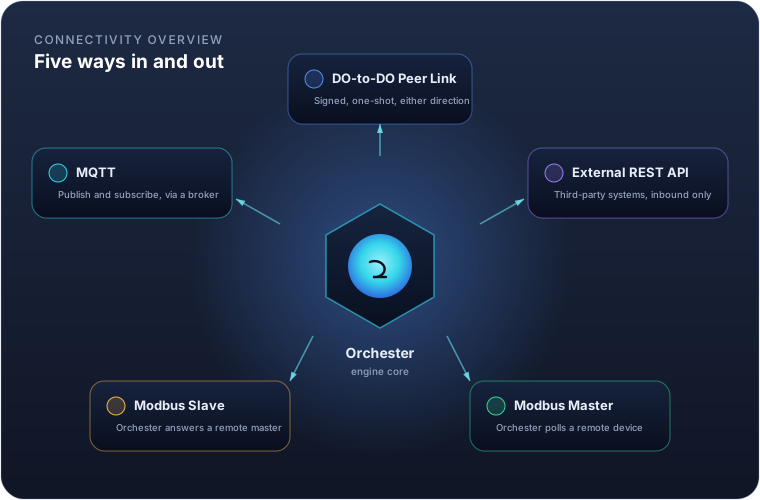
An Orchester instance rarely runs alone. It replicates to and from other instances, accepts data from third-party systems, and polls or answers industrial field devices. Ten mechanisms cover all of it, and this guide walks through each: what it's for, how to configure it, and what to watch out for.
| Method | Who calls whom | Typical use |
|---|---|---|
| DO-to-DO Peer Link | Either side, signed, one-shot | Live values, commands and history between two Orchester instances |
| External REST API | External system calls in | A third-party system pushing data into Orchester |
| Modbus Master | Orchester polls out | Reading from and writing to a PLC, meter or drive |
| Modbus Slave | A remote master calls in | Exposing Orchester's own variables to a SCADA/HMI |
| OPC UA Client | Orchester dials a server | Reading and writing tags on a PLC or gateway that speaks OPC UA |
| OPC UA Server | A remote client calls in | Exposing Orchester's own variables to a SCADA, HMI or reporting tool |
| Siemens S7 | Orchester polls out | Reading and writing PLC memory on a Siemens controller with no OPC UA |
| EtherNet/IP | Orchester polls out | Reading and writing Logix controller tags by name on a Rockwell PLC |
| IEC 104 Client | Orchester dials an RTU | Interrogating and commanding a telecontrol station over IEC 60870-5-104 |
| IEC 104 Server | A utility master dials in | Exposing Orchester's own variables to a utility SCADA as telecontrol points |
DO-to-DO Peer Link
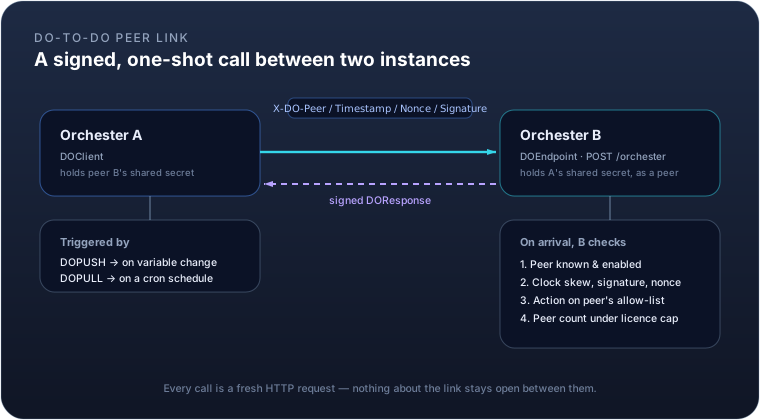
Two Orchester instances talk to each other through a single, generic endpoint: POST /orchester. Every call
carries one action — variables.push, variables.get, variables.set, script.execute, logger.head,
logger.append, or a ping — in a signed envelope, and gets a signed reply. There is no persistent socket:
each call is an ordinary HTTP request, closed once the response arrives — even a pipe, below, is only a request
the dialling side keeps open.
Both instances must hold licences issued to the same organization in the portal: replication stays inside one
organization. A peer whose licence names another organization, or none at all, is refused with FORBIDDEN.
The request is authenticated with four headers — X-DO-Peer, X-DO-Timestamp, X-DO-Nonce,
X-DO-Signature — built from an HMAC-SHA256 signature over the method, path, peer code, timestamp, nonce and a
hash of the body, using a secret both sides already share. A nonce cache rejects any request replayed inside
the clock-skew window, and repeated authentication failures from the same source trip a rate limit.
You don't configure this exchange directly — you configure the peer it runs against, and the modules that use it:
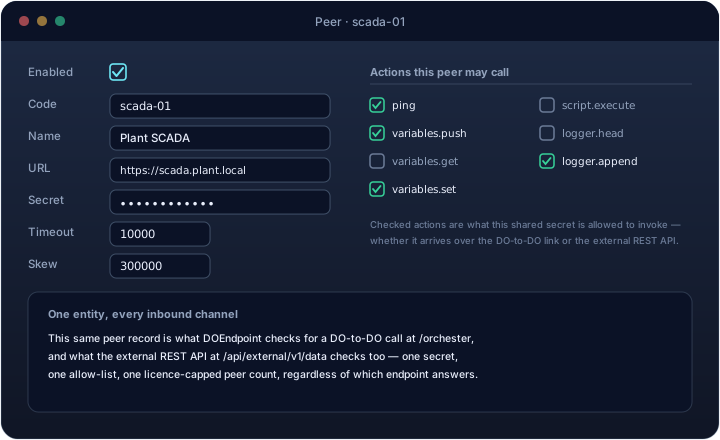
| Field | Meaning |
|---|---|
enabled |
Whether this peer is usable at all |
code |
The identity the far side signs with |
url |
Where to reach the peer — only needed if this instance calls out to it |
secret |
The shared HMAC key, or env:VAR_NAME to read it from an environment variable instead |
timeout |
How long an outbound call waits before giving up (ms) |
skew |
Maximum allowed clock drift between the two sides (ms), default 5 minutes |
writables |
The variables this peer may write here with variables.push. Empty means none: a peer saved without a list is a misconfiguration, not a superuser |
scripting |
Whether this peer may run AScript here (script.execute, variables.set). That is full control of the instance — off by default, and granted only to a peer you trust completely |
Two modules ride on top of a peer: DOPUSH sends variables.push whenever a watched variable changes;
DOPULL calls variables.get on a cron schedule. Both point at the same peer entity, so the URL, secret and
permissions only need to be set once no matter how many modules use that link.
Important
A peer's permissions cover writing and scripting only. Every other action is open to any peer that
authenticates: it can read any variable with variables.get, and append history rows for any variable with
logger.append. Registering a peer is therefore a decision about who may read your plant, not only who may
change it — the secret is the boundary, so treat it as one.
Naming this instance
The code in a peer entity names the far side. This instance's own name is set separately, in the field at the
top of the Orchester panel's left rail, and is stored in entities/.instance.
It has to match the code of the peer entity that represents this instance on the other machine — that name
travels in the X-DO-Peer header and is how the far side knows which secret to verify your request with. An
instance that has never been named calls itself ORCHESTER and says so in its log at every start.
Note
The name does not travel in a configuration export. An archive taken from one plant and imported into another must not rename the instance that imported it — two installations answering to the same code collide replication cursors and replay caches. Set it once per installation, like the licence.
Reaching an instance behind NAT
A site on an outbound-only network — behind NAT, a mobile router, or a firewall that admits no incoming
connection — has no address the control room can dial. It does not need one. Every enabled peer that has a url
is dialled automatically: the instance opens a pipe to it, one signed pipe.poll request held open against the
far side's ordinary endpoint. The far side answers that poll with the next request it has for the dialling
instance — a variables.push from its DOPUSH, a variables.get from its DOPULL, a replicator's logger.head —
and the result travels back on the next poll.
So the usual layout is a control room with an address, and a site whose peer entity for the control room carries
its url. The control room's peer entity for the site needs no url at all: its calls to the site ride down the
pipe.
- A pipe is a transport, not a second protocol. Every request inside it is the same signed envelope, held to the
same
writablesandscriptingpermissions, as one sent directly. - If the far side cannot be reached, the dialling instance backs off and keeps trying, with no restart needed, and says so once in its log.
- When both sides have a
urlfor each other, each keeps its own pipe, and each pipe only carries requests addressed to the instance that dialled it. Nothing decides who dials.
Example. Instance plant-a pushes two variable values to instance plant-b, which has granted it
variables.push:
POST /orchester HTTP/1.1
X-DO-Peer: plant-a
X-DO-Timestamp: 1755000000000
X-DO-Nonce: 7c9e6679-7425-40de-944b-e07fc1f90ae7
X-DO-Signature: 3q2+7wYAAAA9CGFP...

{"v":1,"action":"variables.push","code":"plant-a","id":"7c9e6679-7425-40de-944b-e07fc1f90ae7",
 "data":{"values":{"TEMP_C":21.4,"PUMP_RUNNING":true}}}
plant-b answers with a signed {"status":"OK","data":{"applied":2,"rejected":0,"rejectedNames":[]}}.
If plant-a's peer entity on plant-b does not list one of those variables under writables, that value is
dropped and the answer becomes PARTIAL, naming what was refused:
{"status":"PARTIAL","data":{"applied":1,"rejected":1,"rejectedNames":["PUMP_RUNNING"]}}
PARTIAL is a success, not a retry: the sender logs the refused names and does not send them again, because a
variable the far side will not accept never becomes acceptable by being sent a second time.
External REST API
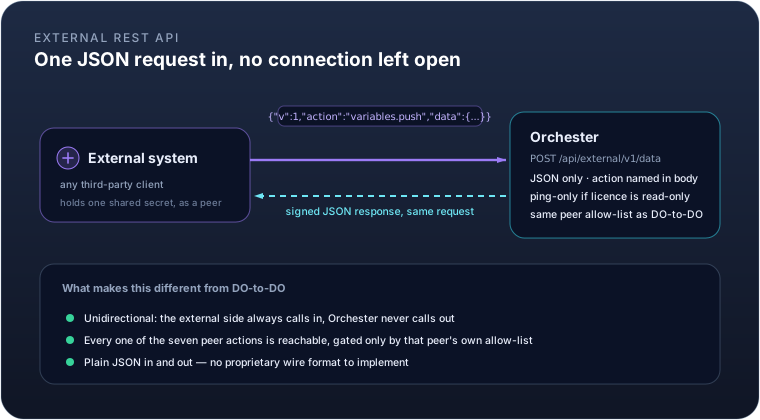
The DO-to-DO link assumes the far side is another Orchester instance, speaking the same internal wire format.
For everything else — a customer's own backend, an integration platform, a script — there's a second endpoint,
POST /api/external/v1/data, built on exactly the same peer, signing, permission and licence model, but
JSON-only and reachable by any system that can compute an HMAC-SHA256 signature.
The request shape is the same one-action-per-call envelope: a JSON body naming the action and carrying its
data, the same four X-DO-* signature headers, and the same peer permissions deciding what a given external
system may write. It's unidirectional by design — the external system always calls in, and Orchester never
calls back out to it, so there's nothing to keep open between requests.
One difference from the internal link: when this instance's licence is in a read-only state (expired, invalid,
or a tampered clock), the external endpoint answers ping only, and refuses everything else. The internal
peer-to-peer channel doesn't carry that restriction, so replication between your own instances keeps working
even while a licence issue is being sorted out — only the door held open to outside systems narrows.
Set this up exactly like a DO-to-DO peer — the same editor, the same two permissions shown above — since it's the same entity either way. List only the variables that integration actually has to write, and leave scripting off: it hands the caller full control of the instance, so reserve it for peers you trust completely. Remember that reads are not scoped — an external system you register can query every variable in the plant.
Example. An ERP system, registered as peer erp-integration with ORDERS_COMPLETED as its only writable
variable and no scripting, records a completed order count:
curl -X POST https://plant.example.com/api/external/v1/data \
  -H "Content-Type: application/json" \
  -H "X-DO-Peer: erp-integration" \
  -H "X-DO-Timestamp: 1755000000000" \
  -H "X-DO-Nonce: 3fa85f64-5717-4562-b3fc-2c963f66afa6" \
  -H "X-DO-Signature: <base64 HMAC-SHA256 over method, path, peer, timestamp, nonce and body>" \
  -d '{"v":1,"action":"variables.push","data":{"values":{"ORDER_COUNT":128}}}'
The signature is computed the same way on any platform: HMAC-SHA256 over
POST\n/api/external/v1/data\n<peer>\n<timestamp>\n<nonce>\n<sha256 of the body>, using the peer's shared
secret — there's no DataOrchester-specific SDK required, just a standard crypto library.
Modbus Master
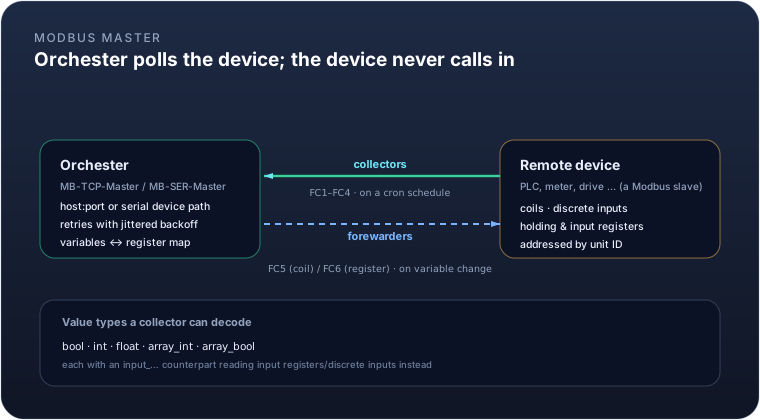
As a Modbus master, Orchester is the one opening the connection — to a PLC, a power meter, a variable-speed
drive, anything that answers Modbus requests. Two module types exist: MB-TCP-Master for Modbus TCP, and
MB-SER-Master for serial RTU over an RS-485/RS-232 line, each configured with the reachability details for
that transport (host/port for TCP; serial device, baud rate, parity and stop bits for RTU) plus a default unit
ID.
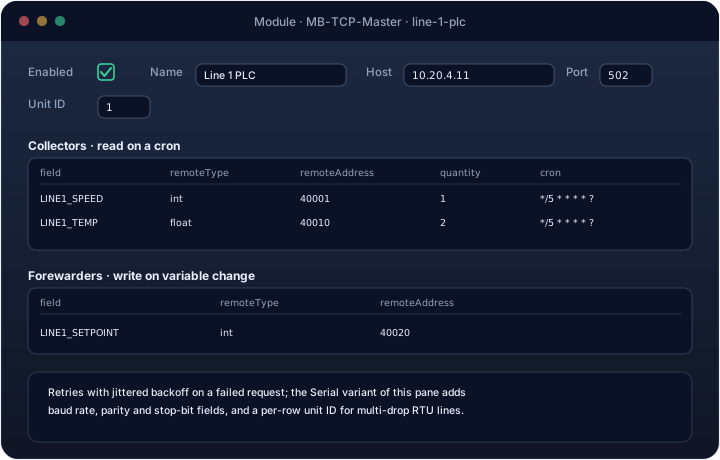
Reading and writing are configured as two independent lists:
- Collectors read from the device on a cron schedule and land the result in a variable. Each row names the
variable, the remote address, and a
remoteTypetelling the module how to decode it:bool/input_bool(coil / discrete input, one bit),int/input_floatand friends (one or two holding/input registers, reassembled into an integer or IEEE-754 float), or anarray_*variant readingquantitywords or coils at once. - Forewarders write to the device whenever their variable changes. The write side is narrower than the
read side — only
bool(a single coil, function code 5) andint(a single register, function code 6) are supported.
Every request retries with a jittered backoff on failure rather than giving up on the first dropped packet or timeout, which matters on a noisy serial line shared by several devices.
Example. Reading a line's temperature (a 32-bit float split across two holding registers) every ten seconds, and writing an operator-adjustable setpoint back when it changes:
Collector    field=LINE1_TEMP_C   remoteType=float  remoteAddress=40010  cron=*/10 * * * * ?
Forewarder   field=LINE1_SETPOINT remoteType=int    remoteAddress=40020
LINE1_TEMP_C now updates itself every ten seconds from the device; writing to LINE1_SETPOINT anywhere in
Orchester — a dashboard, a formula, another peer — sends function code 6 to register 40020 on the PLC.
Modbus Slave
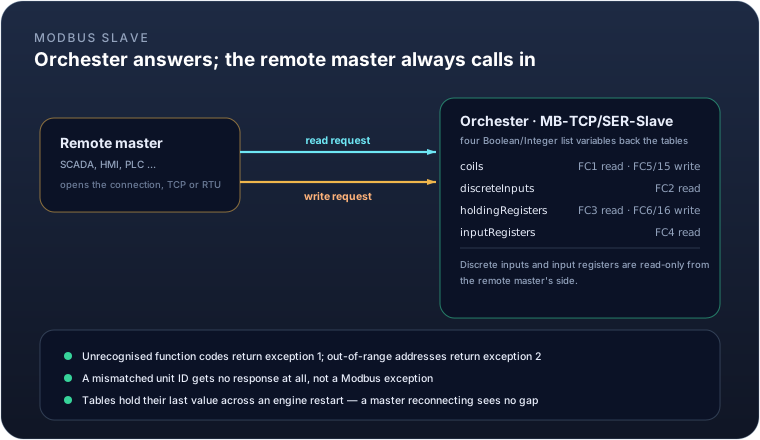
Flip the direction, and Orchester becomes the thing being polled: MB-TCP-Slave and MB-SER-Slave turn an
instance into a Modbus server that a SCADA system, an HMI, or another PLC can read from and write to. Four
list-valued variables back the four Modbus tables:
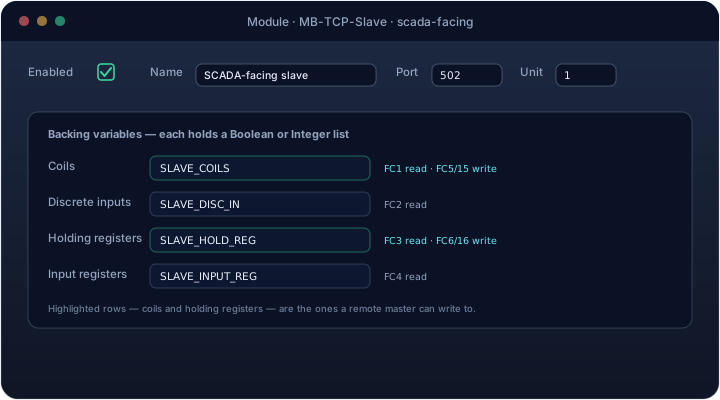
| Table | Backing variable holds | Function codes |
|---|---|---|
| Coils | List<Boolean> |
FC1 read, FC5/FC15 write |
| Discrete inputs | List<Boolean> |
FC2 read |
| Holding registers | List<Integer> |
FC3 read, FC6/FC16 write |
| Input registers | List<Integer> |
FC4 read |
Discrete inputs and input registers are read-only from the remote master's side — only coils and holding registers accept writes, matching their table names.
An unsupported function code comes back as Modbus exception 1; an out-of-range address or a request past the
end of the backing list comes back as exception 2. A request tagged with a unit ID that doesn't match this
slave's configured unit gets no response at all, rather than an exception — indistinguishable, on the wire,
from the slave not existing. And because these are ordinary Orchester variables, they hold their last written
value across an engine restart, so a master reconnecting after a deploy sees continuity, not a gap.
Example. Exposing eight alarm bits and four analog readings to a plant SCADA, unit ID 3:
coils            -> SLAVE_COILS      (List<Boolean>, length 8)
holdingRegisters -> SLAVE_HOLD_REG   (List<Integer>, length 4)
The SCADA reads FC3 at address 2, quantity 1, and gets SLAVE_HOLD_REG[2]. If it writes FC5 to coil 3 to force
an alarm, that write lands in SLAVE_COILS[3], exactly as the table above suggests.
OPC UA Client
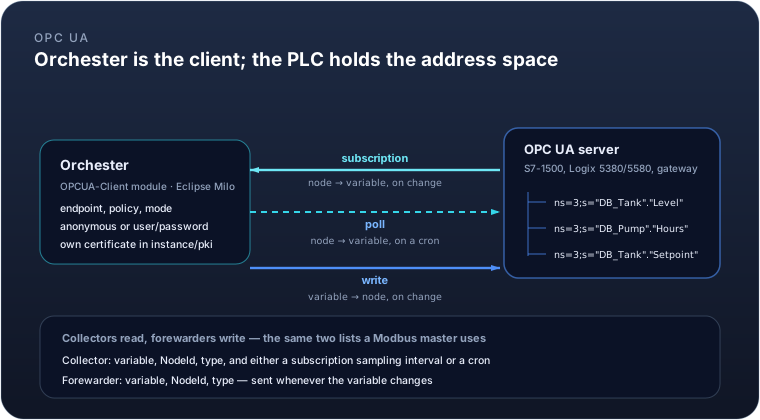
The OPCUA-Client module makes Orchester an OPC UA client. It opens one session to a server — a Siemens S7-1500
or Rockwell Logix 5380/5580 through its built-in server, a dedicated OPC UA gateway, or another SCADA product —
and reads and writes nodes in that server's address space.
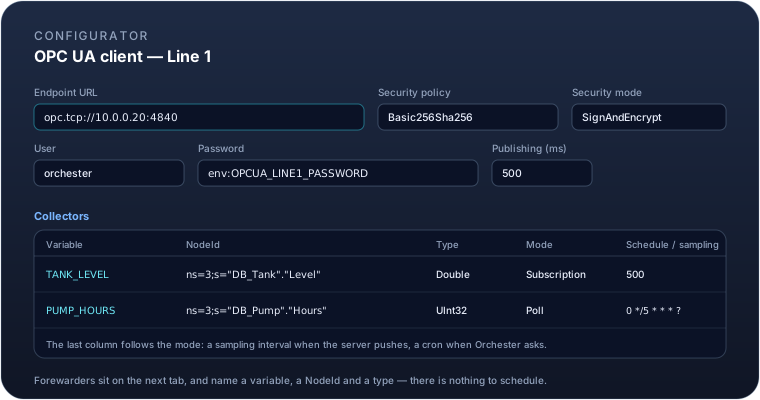
| Field | Meaning |
|---|---|
endpointUrl |
Server address, including scheme and port: opc.tcp://10.0.0.20:4840 |
securityPolicy |
None, Basic256Sha256, Aes128_Sha256_RsaOaep or Aes256_Sha256_RsaPss |
securityMode |
None, Sign or SignAndEncrypt |
userName / password |
Server credentials, if it asks for them. Leave the user empty for anonymous access |
publishingIntervalMs |
How often the server is allowed to publish subscription updates (default 1000) |
Reading and writing are configured as the same two lists a Modbus master uses:
- Collectors bring a node's value into a variable. Each row names the variable, the
nodeIdin the server's own notation (ns=3;s="DB_Tank"."Level"), the OPC UA type it holds, and a mode:subscription, where the server pushes the value whenever it changes, orpoll, where Orchester reads it on a cron. A subscribed row carries a sampling interval instead of a schedule. - Forewarders write a variable out to its node whenever the variable changes.
Saying which OPC UA type a row holds is worth the trouble twice over. It lets the configurator draw the module's
ports before it has ever spoken to the server, and it narrows the value on the way out — a node declared Int16
refuses a write carrying an Int64, however small the number in it.
A password may be written as env:OPCUA_LINE1_PASSWORD, which reads it from the environment at startup instead of
storing it in the configuration.
Certificates
Any security policy other than None means both ends authenticate by certificate. Orchester creates its own on
first connection and keeps it, with the servers it has been shown, under instance/pki/opcua:
instance/pki/opcua/own/        this instance's key pair and certificate
instance/pki/opcua/trusted/    servers this instance accepts
instance/pki/opcua/issuers/    CAs, for servers whose certificate is signed rather than self-signed
instance/pki/opcua/rejected/   servers that were refused
A server Orchester has not been told to trust is refused, and its certificate is filed under rejected/ with
its thumbprint shown in the module's error message. Trusting it is a deliberate act — moving it into trusted/ —
and there is no trust-on-first-use. The first connection to a secured server is therefore expected to fail once.
Example. A tank level read as the PLC changes it, a running-hours counter that only needs checking every five minutes, and an operator setpoint written back when it moves:
Collector    TANK_LEVEL   ns=3;s="DB_Tank"."Level"     Double  subscription  sampling=500ms
Collector    PUMP_HOURS   ns=3;s="DB_Pump"."Hours"     UInt32  poll          cron=0 */5 * * * ?
Forewarder   SETPOINT     ns=3;s="DB_Tank"."Setpoint"  Double
TANK_LEVEL now updates itself whenever the PLC moves it, without Orchester asking; PUMP_HOURS costs one read
every five minutes; and writing SETPOINT from a panel or a formula sends it to the PLC.
OPC UA Server
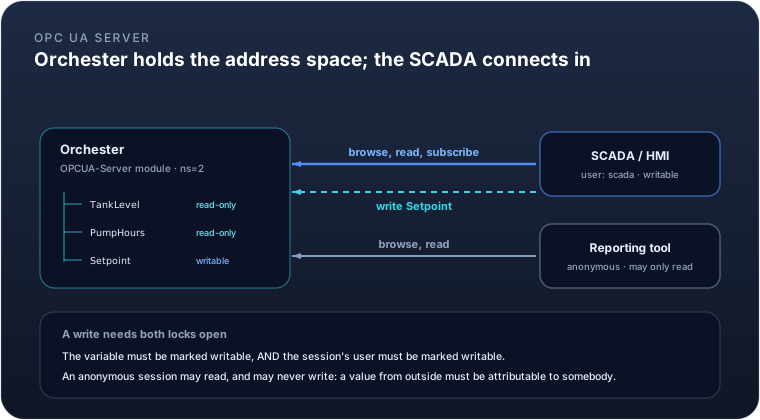
The OPCUA-Server module is the other direction: a SCADA, an HMI or a reporting tool connects in and reads
variables this instance holds. It is to the OPC UA client what the Modbus slave is to the Modbus master — with the
difference that OPC UA can say who is connecting, and Modbus cannot.
| Field | Meaning |
|---|---|
port |
The port to listen on (default 4840) |
securityPolicies |
Which policies to offer: None, Basic256Sha256, Aes128_Sha256_RsaOaep, Aes256_Sha256_RsaPss. An endpoint is published for each |
allowAnonymous |
Whether a session may be opened without a user (default off) |
users |
Who may connect: user name, password, and whether that user may write |
variables |
What is published: the variable, the browse name it appears under, its OPC UA type, and whether it may be written |
Each published variable becomes one node under a folder named after the module, addressed as ns=2;s=<code> on an
instance running a single server module. The namespace index is assigned by the server, not chosen, so it is
written to the log at startup — read it there rather than assuming it.
Who may write
Both locks have to be open. A write is accepted only when the variable is marked writable and the session's user is marked writable. Neither implies the other, and that is deliberate:
- A variable that must never be driven from outside stays read-only whoever is asking.
- A read-only user cannot write even the variables that would otherwise permit it.
- An anonymous session may read, and may never write. A value that changes what a plant does has to be attributable to somebody, and an anonymous session has nobody to attribute it to.
Anything refused comes back as BadUserAccessDenied, which is what the operator's client will show them, rather
than a value that appears to have been accepted and then quietly does nothing.
A user's password may be written as env:OPCUA_SCADA_PASSWORD, read from the environment at startup.
Example. Publishing a tank level for a plant SCADA to read, and one setpoint it may write:
Variable   TANK_LEVEL  browse TankLevel  Double  writable=no
Variable   SETPOINT    browse Setpoint   Double  writable=yes
User       scada       env:OPCUA_SCADA_PASSWORD  writable=yes
User       reports     env:OPCUA_REPORTS_PASSWORD  writable=no
reports can read both and change neither. scada can move SETPOINT, and still cannot touch TANK_LEVEL.
Siemens S7
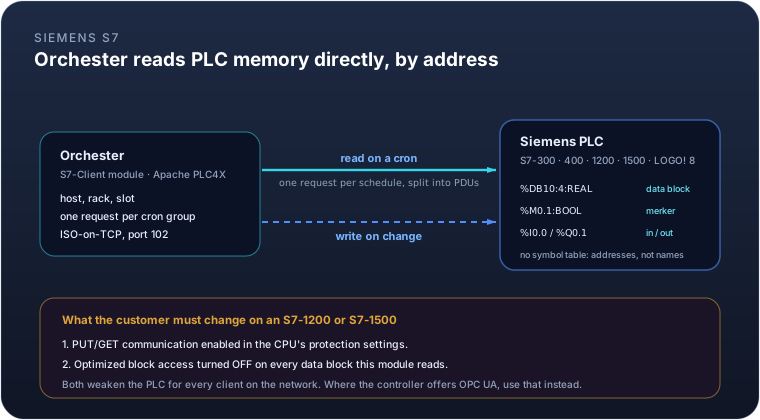
The S7-Client module reads and writes Siemens PLC memory directly, over the classic S7comm protocol on port 102.
It covers the controllers that have no OPC UA server of their own — S7-300, S7-400, S7-200 Smart, LOGO! 8 — and
the S7-1200 and S7-1500 whose owners have not switched theirs on.
Warning
On an S7-1200 or S7-1500 the customer has to change two settings in the CPU, and both weaken it: PUT/GET communication must be enabled in the protection settings, and optimized block access must be turned off on every data block this module reads. Neither change is specific to Orchester — they open the PLC to every client on the network. Where the controller offers OPC UA, use the OPC UA client instead: it needs no such change, and it authenticates and encrypts.
| Field | Meaning |
|---|---|
host |
The PLC's address |
controllerType |
S7_300, S7_400, S7_1200, S7_1500, S7_200_SMART or LOGO. Choosing it fills in the rack and slot |
rack / slot |
Where the CPU sits. S7-300 and S7-400 are rack 0 slot 2; S7-1200 and S7-1500 are rack 0 slot 1 |
requestTimeoutMs |
How long a request may take before it counts as failed (default 5000) |
Reading and writing use the same two lists a Modbus master does. What is different is that an S7 address states its own type, so there is nothing else to keep in step:
%DB10:4:REAL     data block 10, byte 4, a 32-bit float
%DB10.DBD4:REAL  the same address, in the notation TIA Portal shows
%M0.1:BOOL       merker bit 1 of byte 0
%I0.0:BOOL       input bit          %Q0.1:BOOL   output bit
%MW10:INT        merker word 10
%DB1:0:INT[10]   ten consecutive integers
The editor checks an address as you type it and refuses to start a module carrying one it cannot use, naming the
collector. That matters because a wrong address is otherwise discovered on the first poll, in a plant, looking
like a network fault — and some wrong addresses are worse than that: %DB10.DBX4:REAL asks for a single bit and
calls it a float, which a PLC will answer without complaint and with a meaningless number.
Collectors sharing a cron are read in one request, which the driver splits into as many PDUs as the CPU's
capacity needs. Forty addresses on the same schedule cost one round trip, not forty.
There is no symbol browsing: S7comm has no symbol table, so addresses are typed or pasted from TIA Portal, not picked from a list. There are no subscriptions either — S7comm on the 1200 and 1500 does not offer them, so every collector polls.
Example. An oxygen reading taken every five seconds, a blower's run state, and a setpoint written back when an operator moves it:
Collector    O2_T1        %DB10:4:REAL     cron=*/5 * * * * ?
Collector    BLOWER_RUN   %Q0.1:BOOL       cron=*/5 * * * * ?
Forewarder   O2_SETPOINT  %DB10:8:REAL
The two collectors share a schedule, so they are one request. Writing O2_SETPOINT from a panel or a formula
sends it to the PLC.
EtherNet/IP
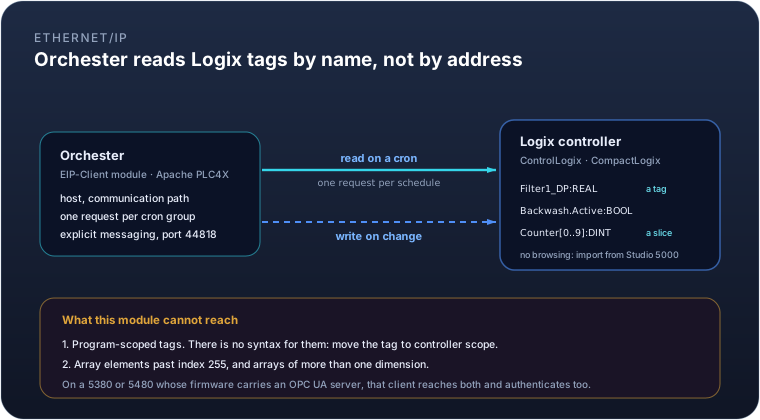
The EIP-Client module reads and writes Rockwell Logix controller tags by name, over EtherNet/IP explicit
messaging on port 44818. It covers ControlLogix and CompactLogix — 5370, 5380 and 5480 — and needs nothing
switched off in the controller to work.
Tip
On a 5380 or 5480 whose firmware carries an OPC UA server, prefer the OPC UA client: it reaches program-scoped tags, which this module cannot, and it authenticates and encrypts. This module is for the controllers and firmware versions that have no OPC UA server at all.
| Field | Meaning |
|---|---|
host / port |
The controller's address, and 44818 unless something in between moves it |
communicationPath |
CIP routing to the CPU when it is not the device answering on the address — 1,0 is backplane, slot 0 |
requestTimeoutMs |
How long a request may take before it counts as failed (default 5000) |
bigEndian |
Off. Turn it on only if a controller refuses to answer at all |
forceUnconnectedOperation |
Off. Turn it on for a gateway or simulator that does not implement the CIP Connection Manager |
Naming a tag
A tag address is a name, a type, and optionally an element or a slice. The type is not optional, and that is
worth a sentence: without it the driver reads every tag as a DINT, so a REAL tag written Filter1_DP returns a
plausible wrong number and nothing anywhere says so.
Filter1_DP:REAL         a controller-scoped tag
Backwash.Active:BOOL    a member of a UDT instance, at any depth
Counter[3]:DINT         one element of an array
Counter[0..9]:DINT      ten elements, which arrive as a list
Types: BOOL, SINT, INT, DINT, LINT, USINT, UINT, UDINT, ULINT, BYTE, WORD, DWORD,
LWORD, REAL, LREAL and STRING. Every integer width lands in a variable as an integer; REAL and LREAL
as a float.
Important
Program-scoped tags cannot be read. Program:MainProgram.Tag has no expressible form here — the driver's
tag grammar has no place for the scope prefix. Move the tag to controller scope, or reach it through the OPC UA
client. The editor says so when you type one, rather than letting it fail on the first poll.
Two more limits come from CIP itself: an element index runs 0 to 255, and an array is one-dimensional —
Counter[256]:DINT and Counter[0..9,0..3]:DINT are both refused when the module loads, naming the collector.
Getting the tag list in
This driver cannot browse a controller, so the tag list has to come from somewhere. Export it from Studio 5000 with Tools → Export → Tags and use Import tags in the editor. Controller-scoped tags of a type this module carries become collectors; an array becomes its first element, because how much to read at once is a decision with a cost and the table is where that cost is visible. Everything skipped is counted and reported: program-scoped tags, UDTs and types this module does not carry, and names already in the table — so importing the same file twice does not produce twice the rows.
Collectors sharing a cron are read in one request. A hundred tags on the same schedule cost one round trip,
not a hundred.
Example. A filter's differential pressure and backwash state every two seconds, with an operator's limit written back when it changes:
Collector    DP_FILTER1        Filter1_DP:REAL        cron=*/2 * * * * ?
Collector    BACKWASH_ACTIVE   Backwash.Active:BOOL   cron=*/2 * * * * ?
Forewarder   DP_LIMIT          Filter1_DP_Limit:REAL
IEC 60870-5-104
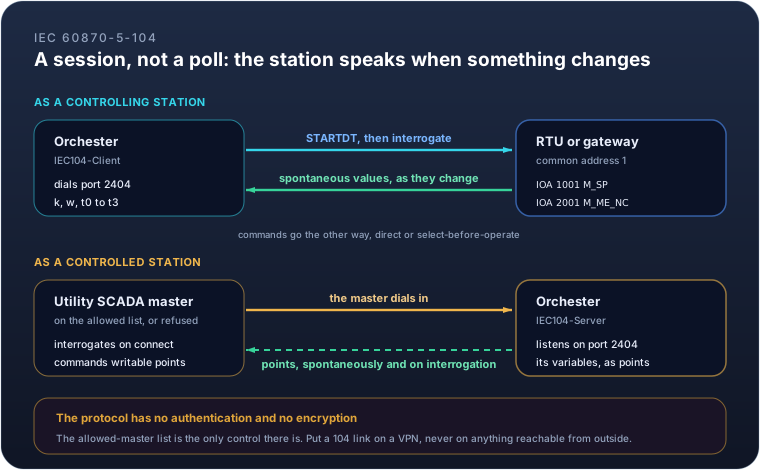
Two modules, one protocol. IEC104-Client is a controlling station: it dials an RTU or a substation
gateway, interrogates it and commands it. IEC104-Server is a controlled station: it answers a utility's
SCADA master and exposes Orchester's own variables as telecontrol points.
The stack is Amtiri's own. Every Java implementation of this protocol is GPLv3 or needs a licence negotiated case by case, so there was no library to use inside a commercial product, and it was written from the standard instead.
Caution
This protocol has no authentication and no encryption. Anyone who can reach port 2404 can read every point and operate every writable one. The allowed-master list is the only control the module offers, and it is not a substitute for a network: put a 104 link on a VPN or a dedicated circuit, never on anything reachable from the internet. IEC 62351 security is not implemented.
A session, not a poll
This is the one thing to understand before configuring either module, because everything else follows from it. A 104 link is a session: it comes up, it is told to start carrying data, and then the station speaks when something changes. Nothing is polled, and a collector therefore has no schedule of its own — it has an address.
1.  TCP connects, and the master sends STARTDT
2.  The master interrogates: "send me everything you have"
3.  The station answers every point, then says it has finished
4.  From then on, the station sends what changes, as it changes
Step 2 matters more than it looks. Until a station has been interrogated, a variable holds whatever it held
before the link came up — so the client interrogates as soon as the link starts, and interrogationCron asks
again on a schedule for the links where that is worth doing.
Naming a point
A point is an information object address — a number from 0 to 16777215, which the utility assigns — and a type, which says what it carries.
| Type | Carries | In a variable |
|---|---|---|
M_SP |
Single point: on or off | boolean |
M_DP |
Double point: on, off, or the two indeterminate states | int (0 to 3) |
M_ST |
Step position | int |
M_BO |
A 32-bit bitstring | int |
M_ME_NA |
Normalised value, a fraction of full scale | float |
M_ME_NB |
Scaled value | int |
M_ME_NC |
Short float | float |
M_IT |
Counter reading | int |
C_SC · C_DC · C_RC |
Single, double and regulating step commands | boolean · int · int |
C_SE_NA · C_SE_NB · C_SE_NC |
Set-point commands | float · int · float |
C_BO |
Bitstring command | int |
A type is named by family, not by its exact identification. M_SP accepts both M_SP_NA_1 and the
time-tagged M_SP_TB_1, because which of the two a station sends is the station's decision and changes with its
firmware — a configuration naming the exact type would stop working the day the RTU was upgraded, for a reason
nobody would find. The exact names are accepted too, for a point list that arrived written that way.
Important
A value the station marks invalid is not written into its variable. Every monitored point carries quality
bits, and IV (invalid) or NT (not topical) mean the station is telling you not to believe the number. The
module logs it and leaves the variable alone: writing it anyway would turn a broken sensor into a plausible
reading, which is the worst outcome available.
The six link parameters
k, w and t0 to t3 have to match what the far end uses. A utility states all six in its interoperability
document, and the defaults are the standard's own.
| Parameter | Default | What it decides |
|---|---|---|
k |
12 | How many messages may be outstanding before the sender waits for an acknowledgement |
w |
8 | After how many received messages an acknowledgement is sent without waiting |
t0 |
30 s | How long to wait for the TCP connection |
t1 |
15 s | How long to wait for an acknowledgement before closing the link |
t2 |
10 s | How long an acknowledgement may be held back |
t3 |
20 s | How long a link may be silent before it is tested |
Two ends that disagree about k produce a link that stalls under load and works perfectly when idle; two that
disagree about t1 produce one that drops every few minutes for no reason either end can see.
As a controlling station
Collector    PUMP1_RUN     IOA 1001   M_SP
Collector    FLOW_IN       IOA 2001   M_ME_NC
Forewarder   PUMP1_CMD     IOA 5001   C_SC     select-before-operate
A forewarder sends a command when its variable changes. With select-before-operate it goes in two steps: the module selects the point, waits for the station to confirm that selection, and only then executes. A station that never confirms therefore never executes, which is the entire purpose of the mechanism — it is used for points where an accidental operation matters, which in a utility is most of them.
clockSyncCron offers the station Orchester's clock. The reverse never happens: a station's clock does not set
this host's, because an RTU with a flat backup battery would otherwise take a plant's whole history with it.
As a controlled station
Point   PUMP1_RUN   IOA 1001   M_SP_TB    spontaneous
Point   FLOW_IN     IOA 2001   M_ME_TF    spontaneous, deadband 0.5
Point   PUMP1_CMD   IOA 5001   C_SC       writable
Three columns decide what a master can do with a point, and they are separate on purpose:
- spontaneous — a change is reported without being asked for. A point that is not spontaneous is still answered in an interrogation, which is what most of a point list is.
- deadband — how much an analogue value must move to be worth a message. Without one, a level transmitter wobbling in its last digit can send several messages a second for ever.
- writable — a command may change this variable. A command to a point that is not writable is refused with a negative confirmation, and the variable is untouched.
allowedClients is fail-closed: a master not named in it is refused, and an empty list refuses everyone.
That is deliberate — an empty list is far more likely to be an unfinished configuration than an invitation.
A clock synchronisation from a master is confirmed and not applied: the plant's clock is not a master's to set, and every log line, history row and licence check in this engine is stamped from it.
The point list
Both editors import and export the point list as CSV, because that is how a utility describes a link — as a spreadsheet with hundreds of rows, none of which anybody should be typing by hand.
IOA,TYPE,VARIABLE,OPTIONS
1001,M_SP,PUMP1_RUN,spontaneous
2001,M_ME_NC,FLOW_IN,"spontaneous,deadband=0.5"
5001,C_SC,PUMP1_CMD,"writable,sbo"
Addresses may be decimal or hexadecimal. Rows whose address or type cannot be read are counted and skipped rather than guessed at, as are addresses already in the table — so importing the same file twice does not double it.
What the status says on each link
Every module here reports through its status variable — see Module status and messages. What each value means depends on what the module is talking to.
| Module | Warning | Error |
|---|---|---|
| Modbus master | Some collectors are answering and some are not, or a slave returned a Modbus exception for one register | Nothing has answered for errorAfterFailures polling cycles in a row |
| Modbus TCP slave | A client that was connecting has stopped, or a request arrived that could not be read | The port could not be bound at all — usually another process already has it |
| Modbus serial slave | Frames are arriving with a bad checksum, which normally means wiring, termination or the baud rate | The serial port has gone, and has stayed gone for errorAfterSeconds |
| OPC UA client | The session dropped and is being re-established, one node returned a bad status, or a write was refused | The server has been unreachable for errorAfterSeconds, or its certificate is not trusted |
| OPC UA server | A published variable could not be updated on its node | The port could not be bound at all — usually another process already has it |
| Siemens S7 | One address was refused while the rest answered | The PLC has been unreachable for errorAfterSeconds, or an address is unusable |
| EtherNet/IP | One tag was refused while the rest answered | The controller has been unreachable for errorAfterSeconds, or a tag is unusable |
| IEC 104 client | A point was reported invalid, a command was refused, or an interrogation did not complete | The station has been unreachable for errorAfterSeconds, or it stopped data transfer |
| IEC 104 server | A master disconnected, or sent a request that could not be read | The port could not be bound at all — usually another process already has it |
| Peer link (push, pull, replicator) | Part of a batch was refused, or some variables are not defined on the far side | The peer refused or was unavailable for errorAfterFailures attempts, or it is not configured here at all |
A Modbus master with one dead register among forty stays at a warning rather than going to error: the link is up and the device is there, which is a different problem from a plant that has lost its PLC.
Choosing between them
- Talking to another Orchester instance: use the DO-to-DO peer link — it's already there, and
DOPUSH/DOPULLcover the common push/pull patterns without any custom code. - Talking to a third-party system that can call you: use the external REST API. It reuses the same peer and licence model as DO-to-DO, so a customer's integration is one more peer entity, not a new trust boundary.
- Talking to a field device that speaks Modbus: use Modbus Master if Orchester should poll the device, or Modbus Slave if the device (or a SCADA layer above it) needs to poll Orchester instead. Both can run at once for the same device family, if some points are read there and others are written here.
- Talking to a Siemens PLC with no OPC UA server: use the S7 client — but read what it asks the customer to switch off first, and prefer OPC UA on any controller that offers it.
- Talking to a Rockwell Logix controller: use the EtherNet/IP client, and import the tag list from Studio 5000 rather than typing it. On a 5380 or 5480 with an OPC UA server in its firmware, prefer OPC UA — it reaches program-scoped tags, which EtherNet/IP here cannot.
- Talking to a water, power or gas utility's telecontrol network: use the IEC 104 client to read an RTU, the IEC 104 server to be read by the utility's SCADA, or both. It is the only protocol here that a utility will usually insist on by name — and the only one with no security of its own, so it belongs on a VPN.
- Exposing Orchester's own variables to a SCADA, HMI or reporting tool that speaks OPC UA: use the OPC UA server. It is to the OPC UA client what the Modbus slave is to the Modbus master, and unlike Modbus it can say who is allowed to write.
- Talking to a PLC or gateway that speaks OPC UA: use the OPC UA client. On a modern Siemens or Rockwell controller this often reaches tags by name without any Modbus mapping, and it carries authentication and encryption that Modbus has no notion of.
All ten share the same underlying safety property: none of them can be configured into pulling more than a licensed instance is entitled to, and none of them stops a running engine on its own. The licence can: What stops a running engine, in How licensing works, says when. A stopped engine writes nothing more to any device, so every device it drives needs a safe state of its own.