
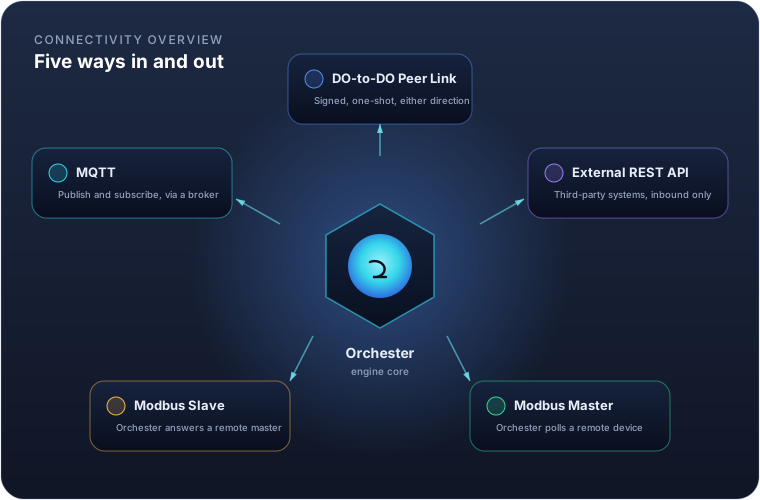
An Orchester instance rarely runs alone. It replicates to and from other instances, accepts data from third-party systems, and polls or answers industrial field devices. Five mechanisms cover all of it, and this guide walks through each: what it's for, how to configure it, and what to watch out for.
| Method | Who calls whom | Typical use |
|---|---|---|
| DO-to-DO Peer Link | Either side, signed, one-shot | Replicating variables or history between two Orchester instances |
| External REST API | External system calls in | A third-party system pushing data into Orchester |
| Modbus Master | Orchester polls out | Reading from and writing to a PLC, meter or drive |
| Modbus Slave | A remote master calls in | Exposing Orchester's own variables to a SCADA/HMI |
| MQTT | Orchester dials a broker | Publishing telemetry and subscribing to commands |
DO-to-DO Peer Link
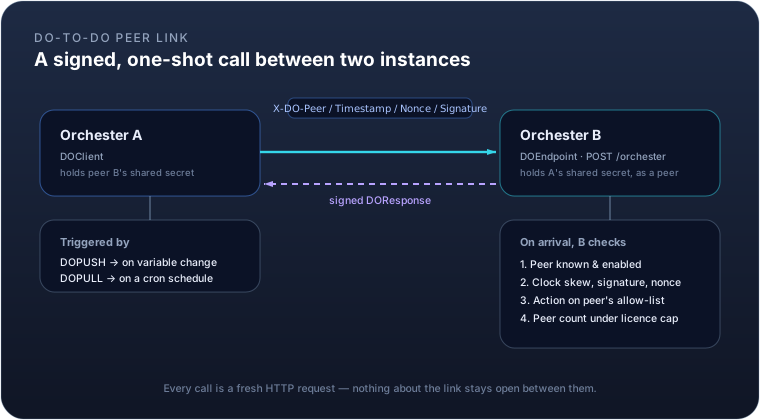
Two Orchester instances talk to each other through a single, generic endpoint: POST /orchester. Every call
carries one action — variables.push, variables.get, variables.set, script.execute, logger.head,
logger.append, or a ping — in a signed envelope, and gets a signed reply. There is no persistent connection:
each call opens a fresh HTTP request and closes it once the response arrives.
The request is authenticated with four headers — X-DO-Peer, X-DO-Timestamp, X-DO-Nonce,
X-DO-Signature — built from an HMAC-SHA256 signature over the method, path, peer code, timestamp, nonce and a
hash of the body, using a secret both sides already share. A nonce cache rejects any request replayed inside
the clock-skew window, and repeated authentication failures from the same source trip a rate limit.
You don't configure this exchange directly — you configure the peer it runs against, and the modules that use it:
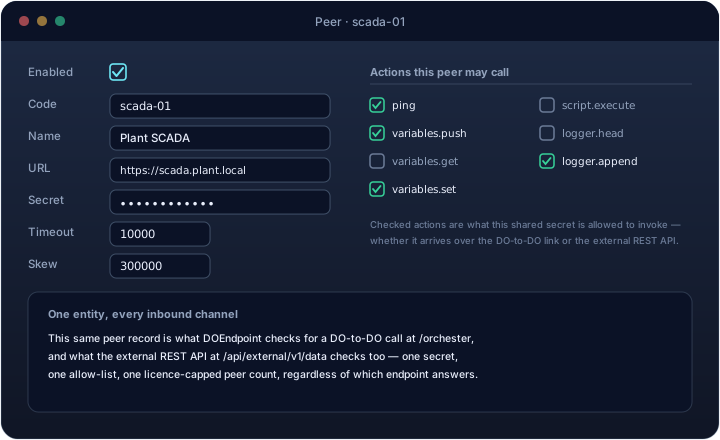
| Field | Meaning |
|---|---|
enabled |
Whether this peer is usable at all |
code |
The identity the far side signs with; also this instance's own identity if flagged self |
url |
Where to reach the peer — only needed if this instance calls out to it |
secret |
The shared HMAC key, or env:VAR_NAME to read it from an environment variable instead |
timeout |
How long an outbound call waits before giving up (ms) |
skew |
Maximum allowed clock drift between the two sides (ms), default 5 minutes |
actions |
The allow-list — which actions this peer may invoke here. Empty means none: a peer entity saved without actions is a misconfiguration, not a superuser |
Two modules ride on top of a peer: DOPUSH sends variables.push whenever a watched variable changes;
DOPULL calls variables.get on a cron schedule. Both point at the same peer entity, so the URL, secret and
allow-list only need to be set once no matter how many modules use that link.
Example. Instance plant-a pushes two variable values to instance plant-b, which has granted it
variables.push:
POST /orchester HTTP/1.1
X-DO-Peer: plant-a
X-DO-Timestamp: 1755000000000
X-DO-Nonce: 7c9e6679-7425-40de-944b-e07fc1f90ae7
X-DO-Signature: 3q2+7wYAAAA9CGFP...

{"v":1,"action":"variables.push","code":"plant-a","id":"7c9e6679-7425-40de-944b-e07fc1f90ae7",
 "data":{"values":{"TEMP_C":21.4,"PUMP_RUNNING":true}}}
plant-b answers with a signed {"status":"OK","data":{"applied":2}} — or FORBIDDEN if plant-a's peer
entity on plant-b doesn't have variables.push in its actions list.
External REST API
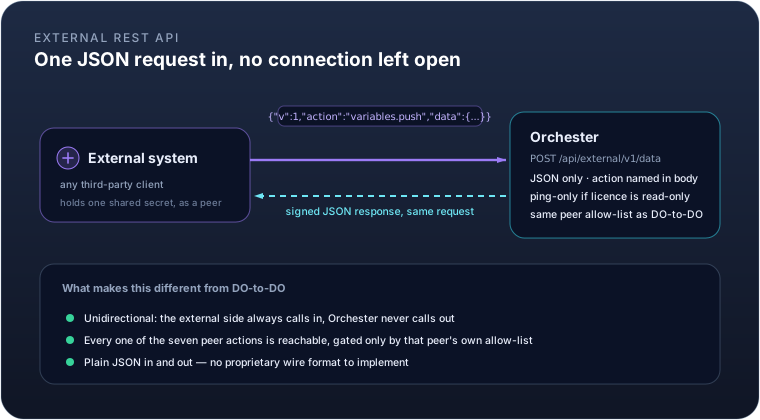
The DO-to-DO link assumes the far side is another Orchester instance, speaking the same internal wire format.
For everything else — a customer's own backend, an integration platform, a script — there's a second endpoint,
POST /api/external/v1/data, built on exactly the same peer, signing, allow-list and licence model, but
JSON-only and reachable by any system that can compute an HMAC-SHA256 signature.
The request shape is the same one-action-per-call envelope: a JSON body naming the action and carrying its
data, the same four X-DO-* signature headers, the same peer allow-list deciding what a given external system
may actually call. It's unidirectional by design — the external system always calls in, and Orchester never
calls back out to it, so there's nothing to keep open between requests.
One difference from the internal link: when this instance's licence is in a read-only state (expired, invalid,
or a tampered clock), the external endpoint answers ping only, and refuses everything else. The internal
peer-to-peer channel doesn't carry that restriction, so replication between your own instances keeps working
even while a licence issue is being sorted out — only the door held open to outside systems narrows.
Set this up exactly like a DO-to-DO peer — the same editor, the same actions allow-list shown above — since
it's the same entity either way. Grant only the actions that integration actually needs: script.execute in
particular hands the caller full control of the instance, so reserve it for peers you trust completely.
Example. An ERP system, registered as peer erp-integration with only variables.push granted, records a
completed order count:
curl -X POST https://plant.example.com/api/external/v1/data \
  -H "Content-Type: application/json" \
  -H "X-DO-Peer: erp-integration" \
  -H "X-DO-Timestamp: 1755000000000" \
  -H "X-DO-Nonce: 3fa85f64-5717-4562-b3fc-2c963f66afa6" \
  -H "X-DO-Signature: <base64 HMAC-SHA256 over method, path, peer, timestamp, nonce and body>" \
  -d '{"v":1,"action":"variables.push","data":{"values":{"ORDER_COUNT":128}}}'
The signature is computed the same way on any platform: HMAC-SHA256 over
POST\n/api/external/v1/data\n<peer>\n<timestamp>\n<nonce>\n<sha256 of the body>, using the peer's shared
secret — there's no DataOrchester-specific SDK required, just a standard crypto library.
Modbus Master
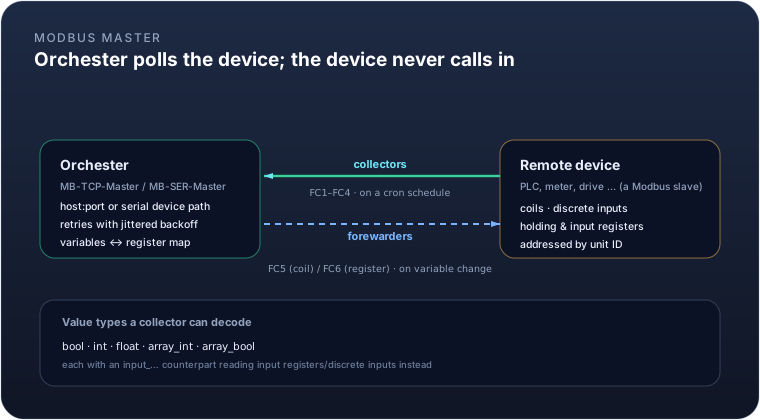
As a Modbus master, Orchester is the one opening the connection — to a PLC, a power meter, a variable-speed
drive, anything that answers Modbus requests. Two module types exist: MB-TCP-Master for Modbus TCP, and
MB-SER-Master for serial RTU over an RS-485/RS-232 line, each configured with the reachability details for
that transport (host/port for TCP; serial device, baud rate, parity and stop bits for RTU) plus a default unit
ID.
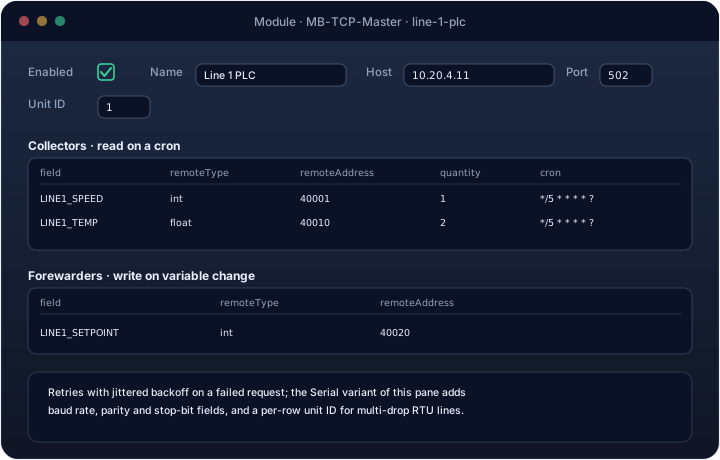
Reading and writing are configured as two independent lists:
- Collectors read from the device on a cron schedule and land the result in a variable. Each row names the
variable, the remote address, and a
remoteTypetelling the module how to decode it:bool/input_bool(coil / discrete input, one bit),int/input_floatand friends (one or two holding/input registers, reassembled into an integer or IEEE-754 float), or anarray_*variant readingquantitywords or coils at once. - Forewarders write to the device whenever their variable changes. The write side is narrower than the
read side — only
bool(a single coil, function code 5) andint(a single register, function code 6) are supported.
Every request retries with a jittered backoff on failure rather than giving up on the first dropped packet or timeout, which matters on a noisy serial line shared by several devices.
Example. Reading a line's temperature (a 32-bit float split across two holding registers) every ten seconds, and writing an operator-adjustable setpoint back when it changes:
Collector    field=LINE1_TEMP_C   remoteType=float  remoteAddress=40010  cron=*/10 * * * * ?
Forewarder   field=LINE1_SETPOINT remoteType=int    remoteAddress=40020
LINE1_TEMP_C now updates itself every ten seconds from the device; writing to LINE1_SETPOINT anywhere in
Orchester — a dashboard, a formula, another peer — sends function code 6 to register 40020 on the PLC.
Modbus Slave
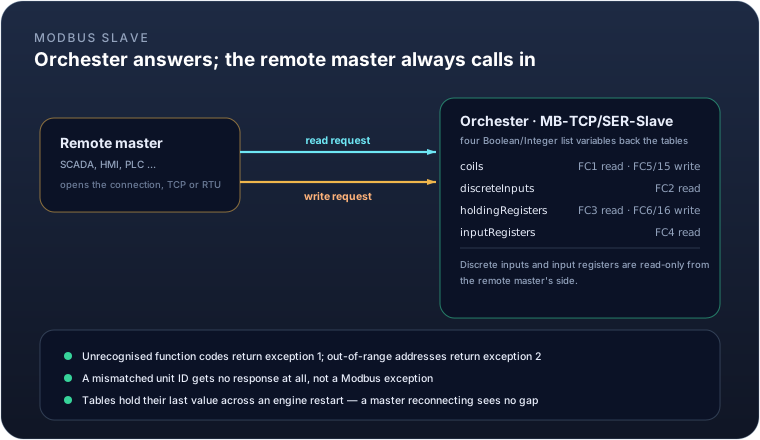
Flip the direction, and Orchester becomes the thing being polled: MB-TCP-Slave and MB-SER-Slave turn an
instance into a Modbus server that a SCADA system, an HMI, or another PLC can read from and write to. Four
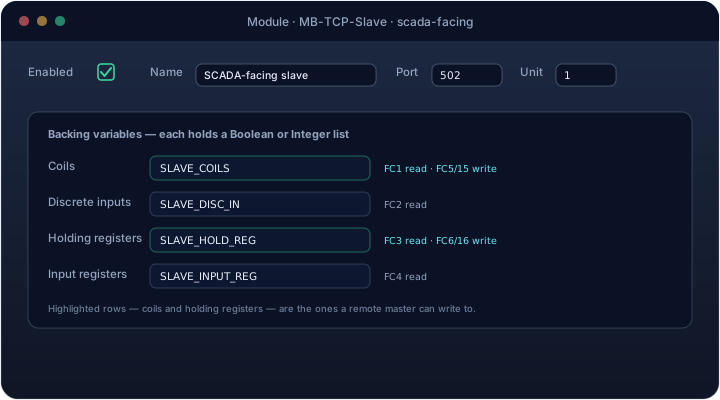
list-valued variables back the four Modbus tables:
| Table | Backing variable holds | Function codes |
|---|---|---|
| Coils | List<Boolean> |
FC1 read, FC5/FC15 write |
| Discrete inputs | List<Boolean> |
FC2 read |
| Holding registers | List<Integer> |
FC3 read, FC6/FC16 write |
| Input registers | List<Integer> |
FC4 read |
Discrete inputs and input registers are read-only from the remote master's side — only coils and holding registers accept writes, matching their table names.
An unsupported function code comes back as Modbus exception 1; an out-of-range address or a request past the
end of the backing list comes back as exception 2. A request tagged with a unit ID that doesn't match this
slave's configured unit gets no response at all, rather than an exception — indistinguishable, on the wire,
from the slave not existing. And because these are ordinary Orchester variables, they hold their last written
value across an engine restart, so a master reconnecting after a deploy sees continuity, not a gap.
Example. Exposing eight alarm bits and four analog readings to a plant SCADA, unit ID 3:
coils            -> SLAVE_COILS      (List<Boolean>, length 8)
holdingRegisters -> SLAVE_HOLD_REG   (List<Integer>, length 4)
The SCADA reads FC3 at address 2, quantity 1, and gets SLAVE_HOLD_REG[2]. If it writes FC5 to coil 3 to force
an alarm, that write lands in SLAVE_COILS[3], exactly as the table above suggests.
MQTT
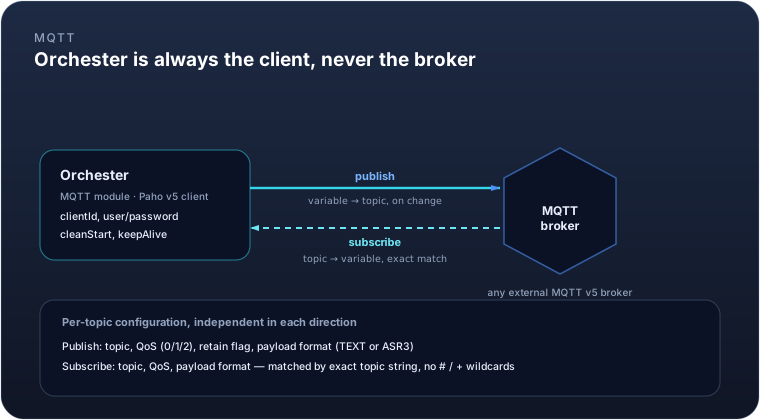
The MQTT module makes Orchester an MQTT v5 client — never a broker. It opens one connection to an external
broker and, independently in each direction, publishes variable values out to topics and subscribes to topics
that update variables.
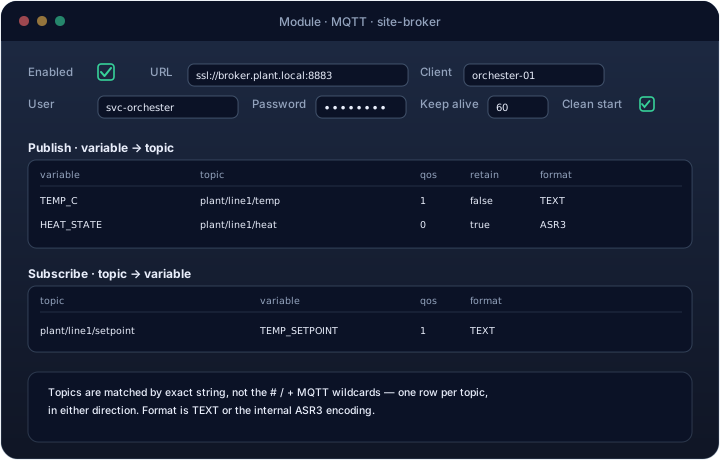
| Field | Meaning |
|---|---|
url |
Broker address, including scheme (tcp:// or ssl://) and port |
client |
The MQTT client ID this instance presents |
user / password |
Broker credentials, if required |
cleanStart |
Whether to start a fresh session on connect (default on) |
keepAlive |
Keep-alive interval in seconds (default 60) |
Publish and subscribe are both configured as maps, one row per topic:
- Publish: variable to topic, with a QoS level, a retain flag, and a payload format — plain
TEXTor the internalASR3encoding, which round-trips richer types than a plain string can. - Subscribe: topic to variable, with the same QoS and format choice.
Topic matching is an exact string comparison — there's no #/+ wildcard support, so a subscription needs one
row per concrete topic it should react to.
Example. A line records its power draw in the POWER_KW variable and needs it visible to a plant-wide
dashboard subscribed to the site broker, while a remote setpoint arrives over the same broker:
Publish     POWER_KW -> plant/line1/power        QoS 1  retain=false  format=TEXT
Subscribe   plant/line1/setpoint -> TEMP_SETPOINT QoS 1  format=TEXT
Choosing between them
- Talking to another Orchester instance: use the DO-to-DO peer link — it's already there, and
DOPUSH/DOPULLcover the common push/pull patterns without any custom code. - Talking to a third-party system that can call you: use the external REST API. It reuses the same peer and licence model as DO-to-DO, so a customer's integration is one more peer entity, not a new trust boundary.
- Talking to a field device that speaks Modbus: use Modbus Master if Orchester should poll the device, or Modbus Slave if the device (or a SCADA layer above it) needs to poll Orchester instead. Both can run at once for the same device family, if some points are read there and others are written here.
- Talking to a message broker, or integrating with anything already built around publish/subscribe: use the MQTT module.
All five share the same underlying safety property: none of them can be configured into pulling more than a licensed instance is entitled to, and none of them de-energizes a running engine on their own — a licence issue narrows what a peer or the external API will answer, it never stops a module that's already driving a device.